

SQL analytical (window) functions use the OVER() clause to perform calculations across a set of related rows without collapsing them into a group, unlike aggregate functions. This post covers how window functions work, partitioning and ordering within the OVER clause, and practical uses of ROW_NUMBER, RANK, DENSE_RANK, LAG, LEAD, and aggregate window functions.
Introduction to Analytical Functions
- Analytical functions use the OVER() clause and are quite different to standard SQL
- Analytical functions are also known as "Window functions"
- Analytical functions compute their result based on a "window" of one or more rows
- Unlike aggregation operations such as Group By, they do not collapse rows
Let's say if we want to get total population of region id 20
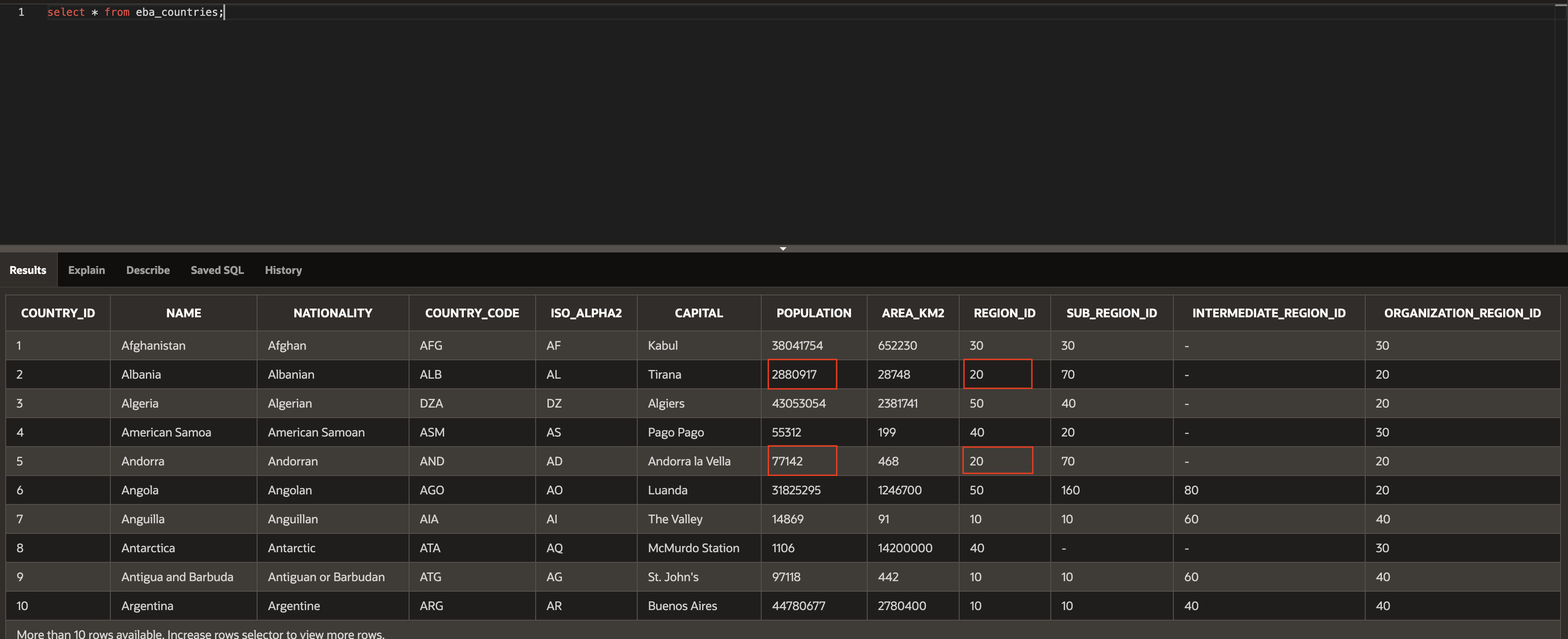
We can do like below to get the total population for each region
select region_id, sum(population)
from eba_countries
where region_id = 20
group by region_id;
Another one, if we want to get the total population with percentage for each region we can do like below:
select
a.name,
a.region_id,
a.population,
b.region_pop,
round(a.population / b.region_pop * 100, 2) as pct_of_region_total
from eba_countries a
left join
(select region_id, sum(population) as region_pop
from eba_countries
group by region_id) b
on a.region_id = b.region_id;
This query works but is not a very straightforward query. So, we can use analytical functions to get same result.
select
name,
population,
region_id,
round(population/sum(population) over (partition by region_id) + 100, 2) as pct_of_region_pop
from eba_countries;
OVER()
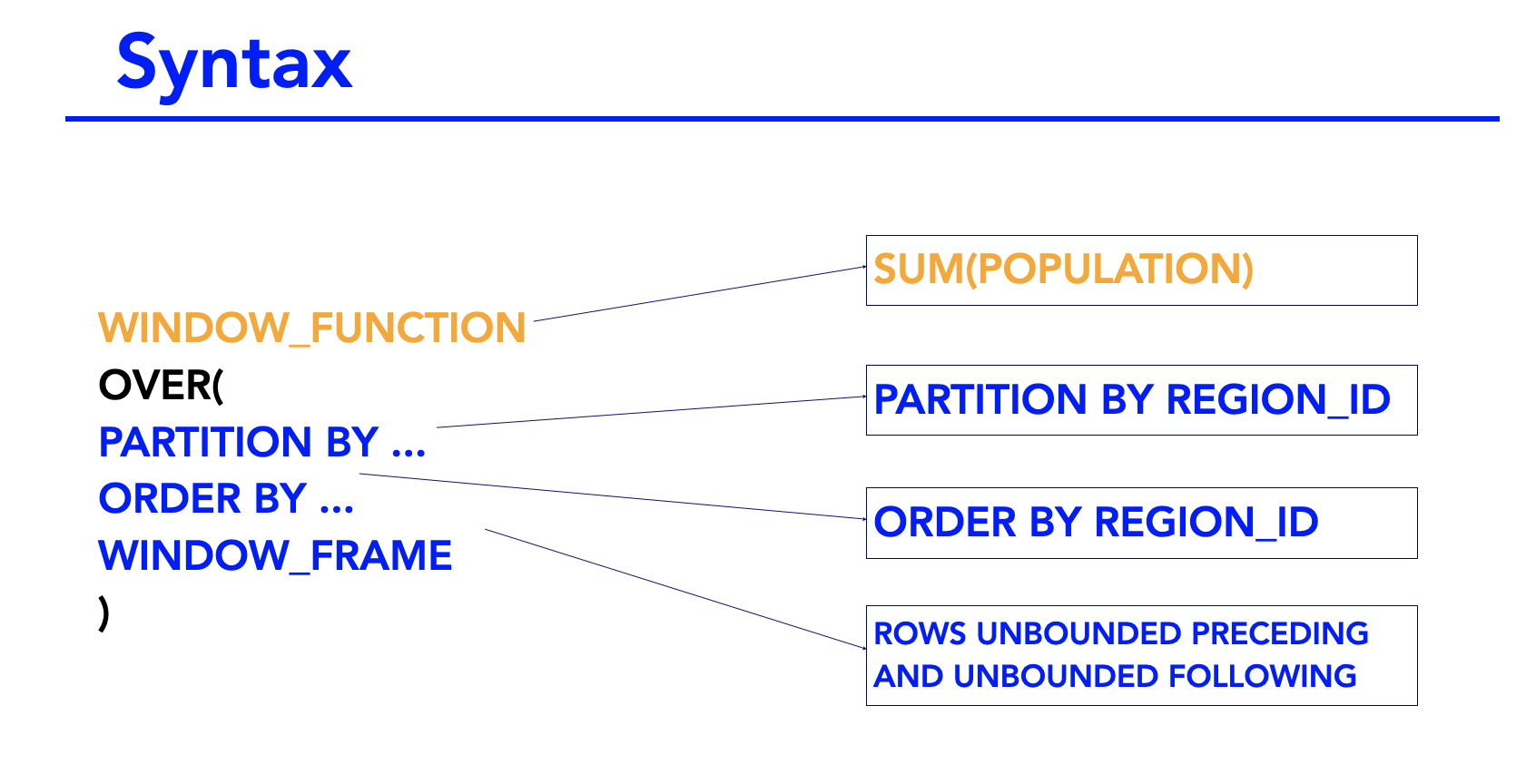
OVER clause is what determines the partitioning and ordering of the row set before the window function itself is applied.
OVER(
PARTITION BY ...
ORDER BY ...
WINDOW_FRAME
)
In the syntax within the over clause, you can specify the partition, the ordering and the window frame itself. If you do not specify any partition, then the over clause applies to the entire table.
select
name,
sum(population) over()
from eba_countries;
The result returns the sum of the population for the entire table. Because we haven't specified any partition or window frame. The function has summed all rows in the table.
The OVER clause - Partition By
We can specify partitions for our window functions. For example, if we want the sum returned for the total region ID for that specific row, we can state partition by region_id . So, if the row has a region_id of ten, then we will return the total population for region_id ten.
select
name,
population,
region_id,
sum(population) over(partition by region_id)
from eba_countries;
select
name,
population,
region_id,
sub_region_id,
sum(population) over(partition by region_id,sub_region_id)
from eba_countries;
Order by
ORDER BY clause is used to order the rows in each partition. You can order by more than one column.
select
name,
population,
region_id,
sub_region_id,
sum(population) over(partition by region_id order by sub_region_id desc)
from eba_countries;
An Introduction To Window Frames
After you apply your partitions and order by clauses, you have to define a window frame. The window frame defines the rows that are used in the analytical function. So if we use a sum aggregation, then for each partition of the table, the window frame defines which rows to sum, hence the term window frame.
In a partition, as you move down each row, you have the current rows and you have the rows which are preceding the current row and you also have the rows which are following the current row. Of course, if your current row is at the top or bottom of the partition, then there are no preceding or following rows.
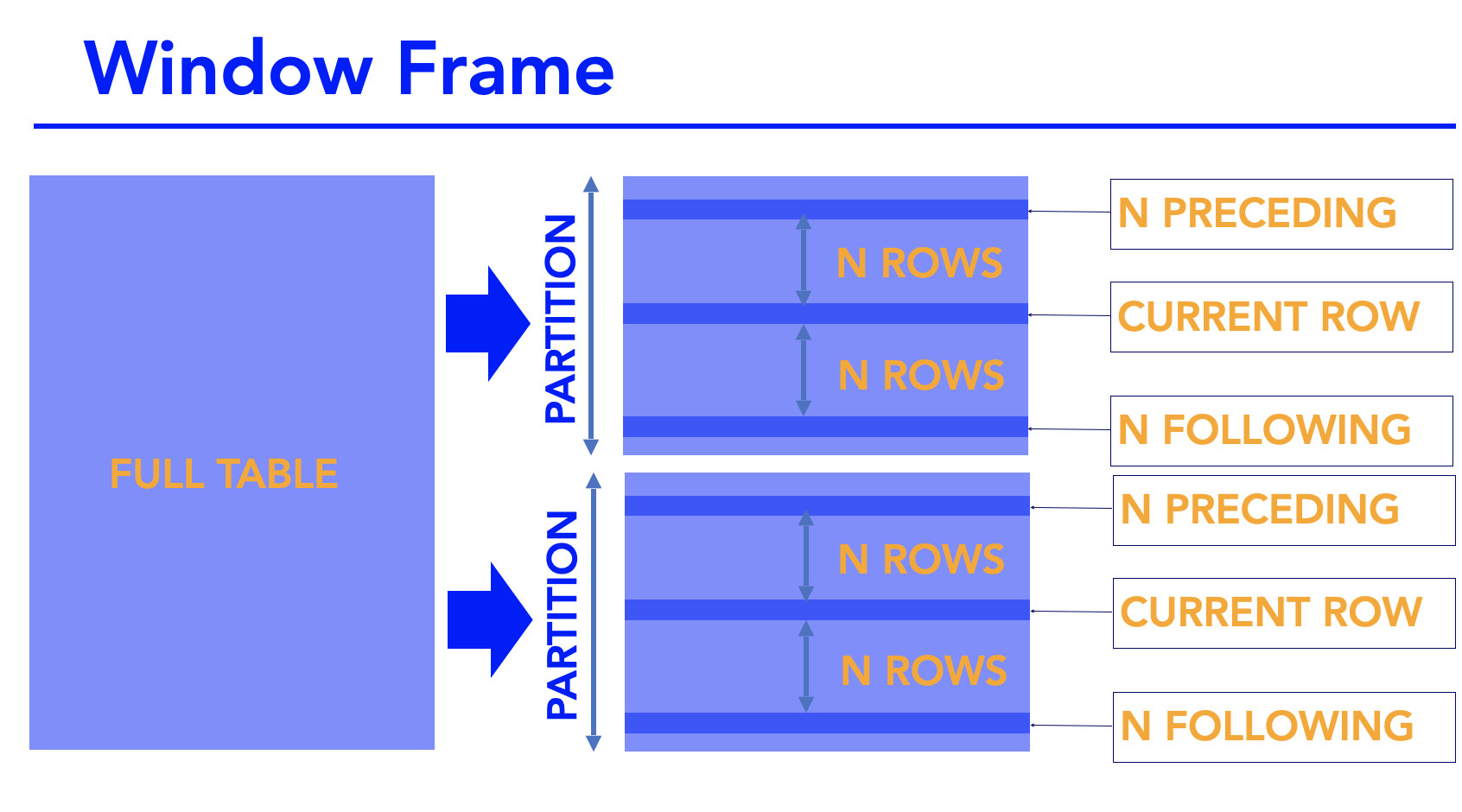
So, in the illustration, we have a partition from a table. In that partition we have the current row. And then you have another row that is n rows above it in the partition. We term that as N preceding. So if it was two rows preceding, we would say two preceding. You have another row that comes in rows after and we say n following. If it came three rows after, we would say three following.
Syntax
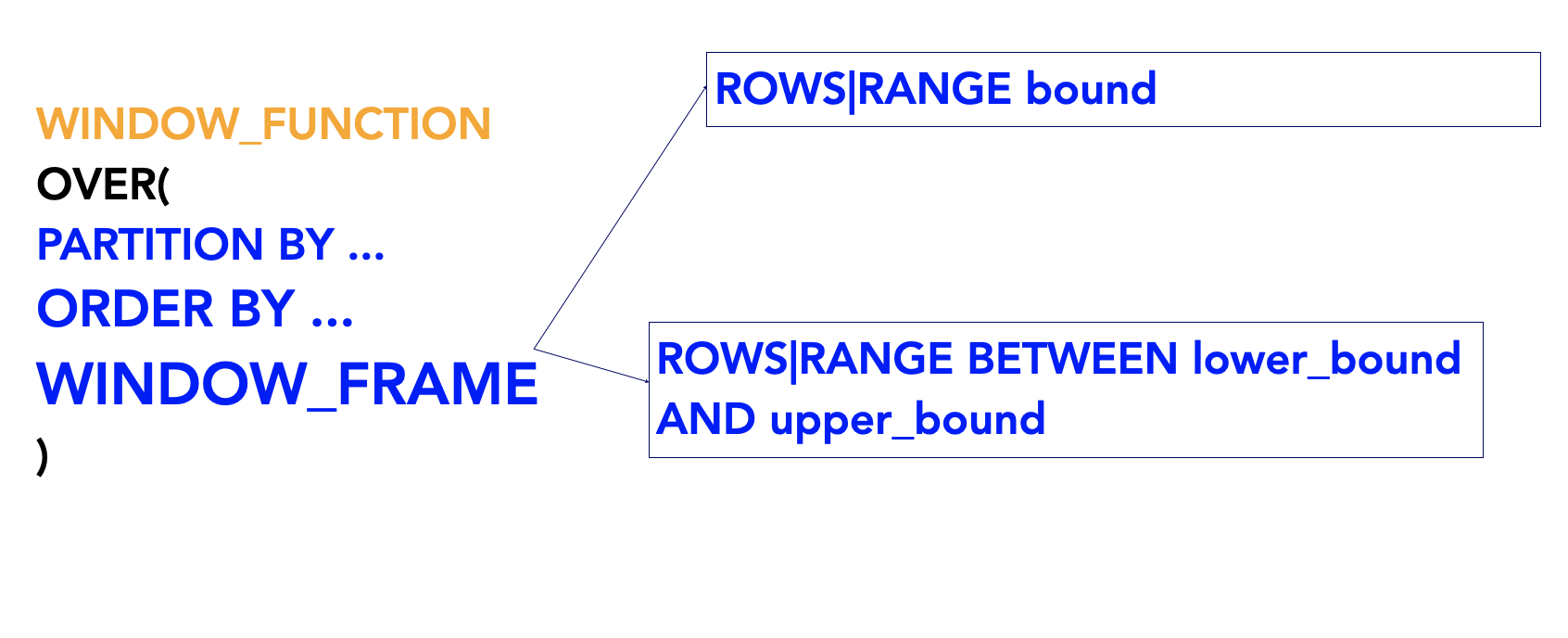
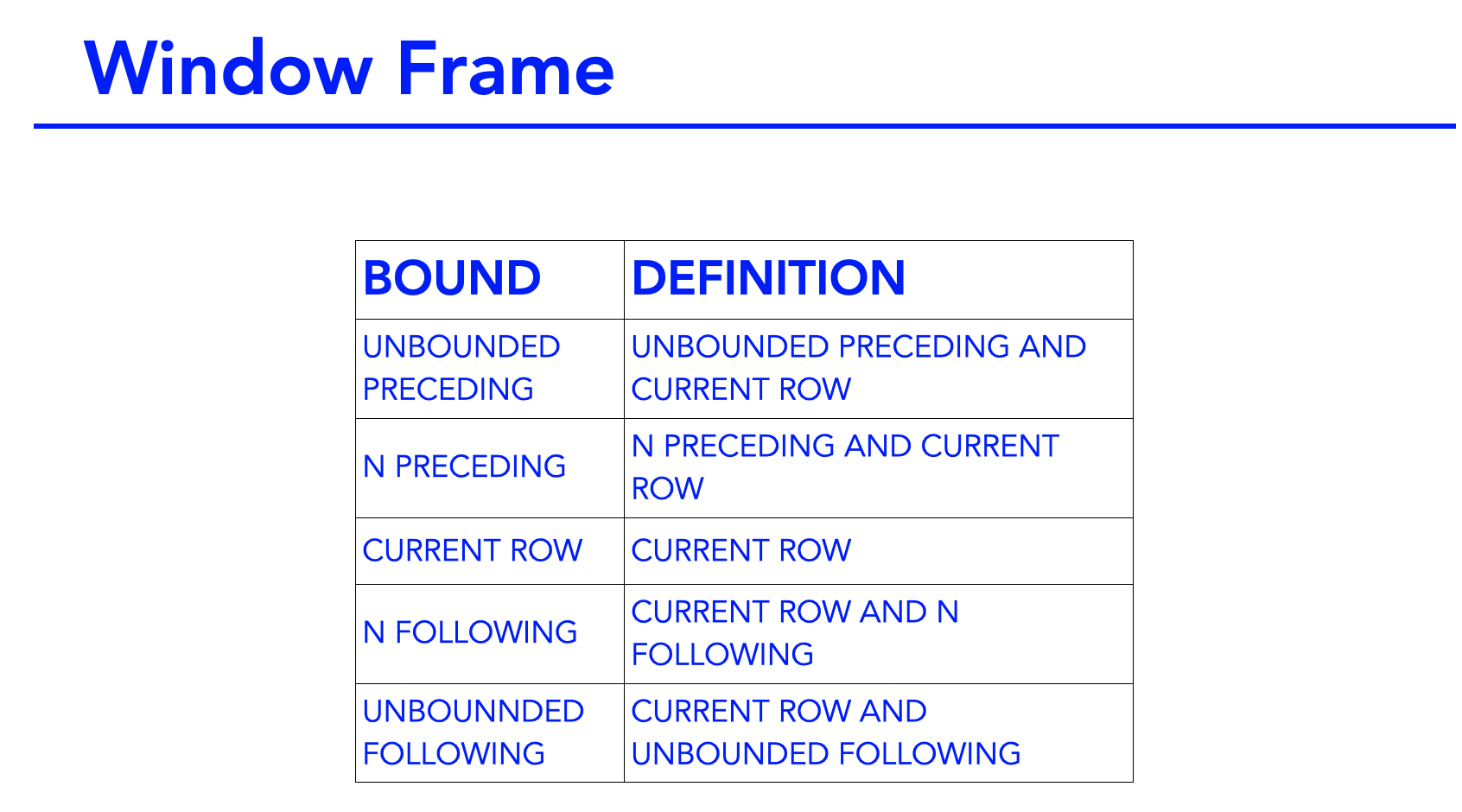
So, we already know that rows are in a table. A range is a value. And in your window frame, you include all rows where the value is within that defined range.
When defining just one bound you type rows or range followed by the bound. For example, row one preceding or range, one preceding. When defining lower and upper bounds, you type the rows or range followed by the BETWEEN keyword. The lower bound the the upper bound. The lower bound must come before the upper bound.
Analytical Functions - LAG, LEAD, NTILE and NTH_VALUE
LAG function returns a value from a previous row of the table. It takes in three parameters. The first parameter is the expression. This can be a field like population or name, and it can also include a field that has an inbuilt function applied to it.
Second parameter is the offset. By default, this is one meaning that it takes the value from the previous row. If you type two, it would take the value from two rows above the current row.
The third parameter is the value to display if there are no previous values. By default, this is null.
The LAG analytic function should also have an ORDER BY clause inside the over clause if you're using ORACLE. For other database management systems such as MySQL, you may not need to specify an ORDER BY clause. It just depends based on what database management system you're using. Different ones will have different requirements.
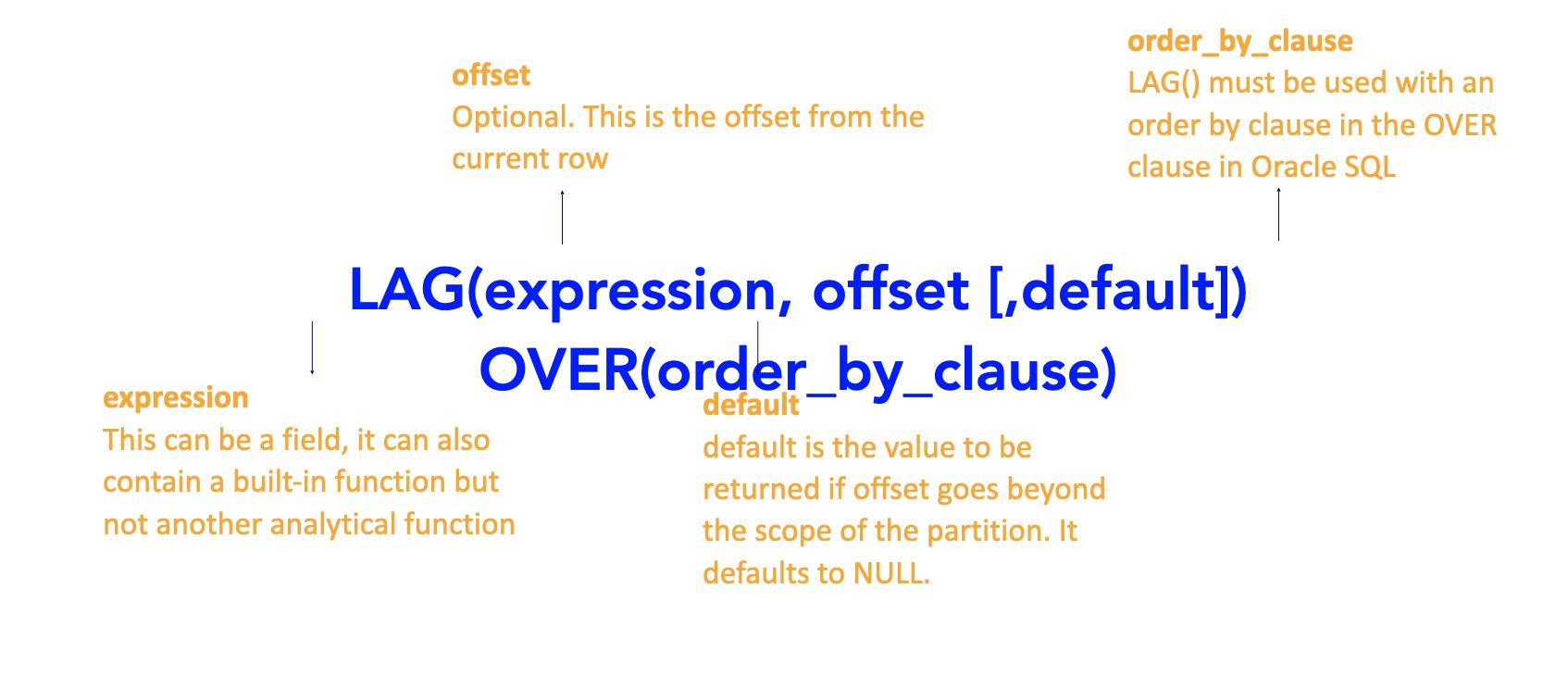
Example:
select name, population, lag(name) over(order by name)
from eba_countries;
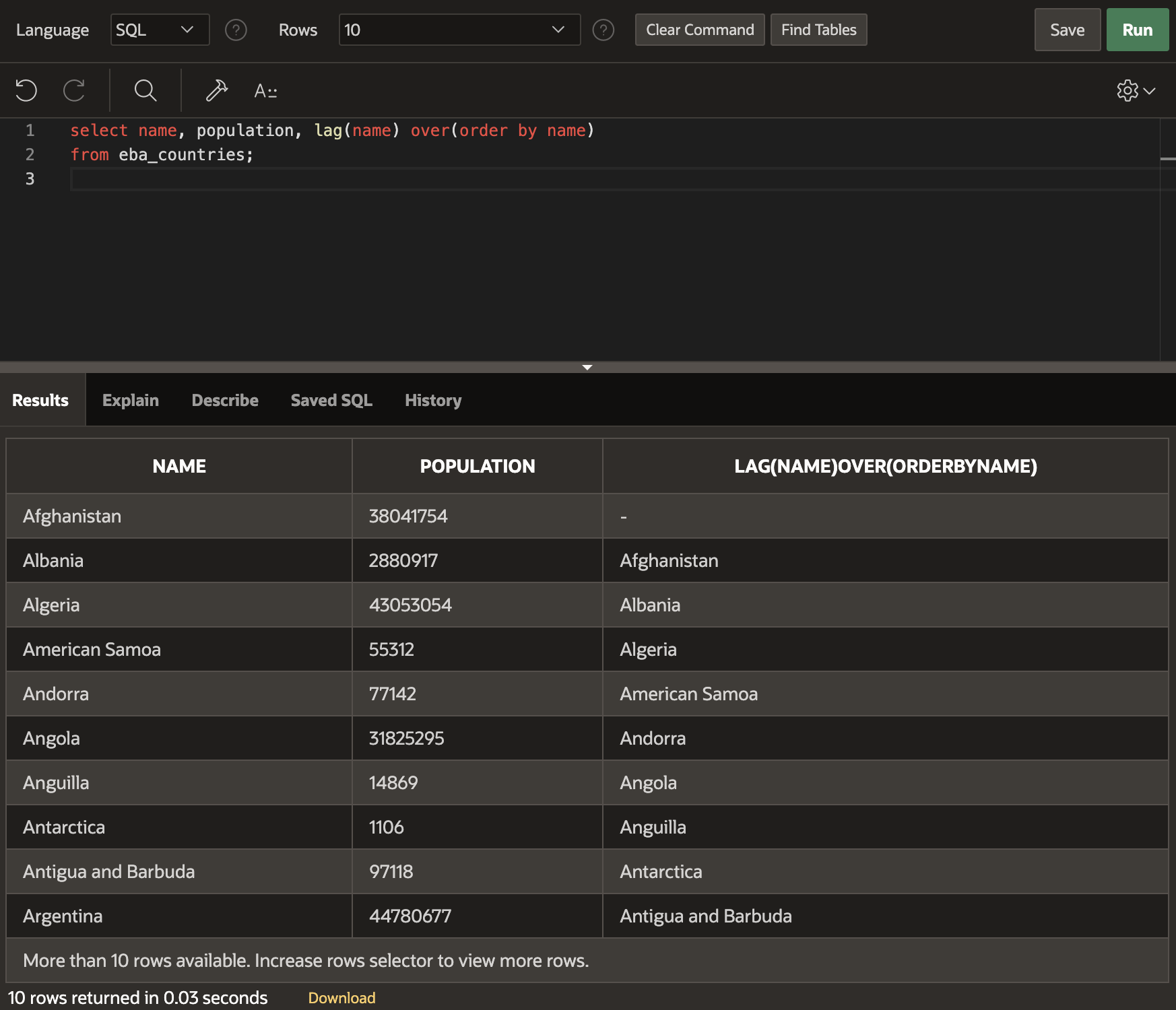
LEAD()
select name, population, lead(name) over(order by name)
from eba_countries;
NTILE()
select name, population, ntile(3) over(order by population)
from eba_countries;
NTH_VALUE()
select name, population, nth_value(name, 3) over()
from eba_countries;
Ranking Functions
Ranking functions are ROW_NUMBER, RANK and DENSE_RANK.
ROW_NUMBER returns a unique number for each row in your data. The function takes no parameters and it numbers each row based on the order of the data. ROW_NUMBER requires an order by clause within the over clause if you're using Oracle, but you don't need it for the other database management systems such as MySQL.
RANK will rank your data within each partition. It will assign the same rank for tied values and there can be gaps in the numbering. For example, if two values are tied for second place, the next available ranking will be four.
DENSE_RANK will also rank your data within each partition. It will assign the same rank for tied values, but this time there will not be gaps in the numbering. For example, if two values are tied for second place, the next available number will be three. To get the desired result for RANK and DENSE_RANK, you need to apply the order by clause in the over clause for the field you would like to be ranked.
select name, population,
row_number() over(order by population),
rank() over(order by population),
dense_rank() over (order by population)
from eba_countries;
select name, population, region_id,
row_number() over(partition by region_id order by population),
rank() over(partition by region_id order by population),
dense_rank() over (partition by region_id order by population)
from eba_countries;
Distribution Functions
The distribution functions are PERCENT_RANK and CUME_DIST.
PERCENT_RANK is the percentile ranking of the number of a row between 0 and 1. The formula is
(RANK - 1)/(Total number of rows in partition -1)
CUME_DIST is the cumulative distribution of a value within a group of values. Formula is
(Number of rows <= Current rows value)/(Total Number of Rows in partition)
To get the desired result for percent rank and CUME_DIST functions, you need to apply the order by clause inside the over clause for that field that you would like evaluated. If you're using Oracle SQL, the order by clause is mandatory, and the omission of an order by clause will result in the query failure.
select name, population,
percent_rank() over (order by population),
cume_dist() over (order by population)
from eba_countries;
select name, population, region_id,
percent_rank() over (partition by region_id order by population),
cume_dist() over (partition by region_id order by population)
from eba_countries;
Scenarios 1
Find the population difference between the countries in the current row VS the country with the highest population.
select name, population, max(population) over()
from eba_countries;
select name, population,
max(population) over(),
population - max(population) over() as diff_from_max_pop
from eba_countries;
Scenario 2
Arrange the countries in order of population from largest to smallest and find the difference between the population of the current rows country and the country immediately following it.
select name, population,
lead(population, 1) over (order by population desc),
population - lead(population, 1) over(order by population desc) as variance
from eba_countries;
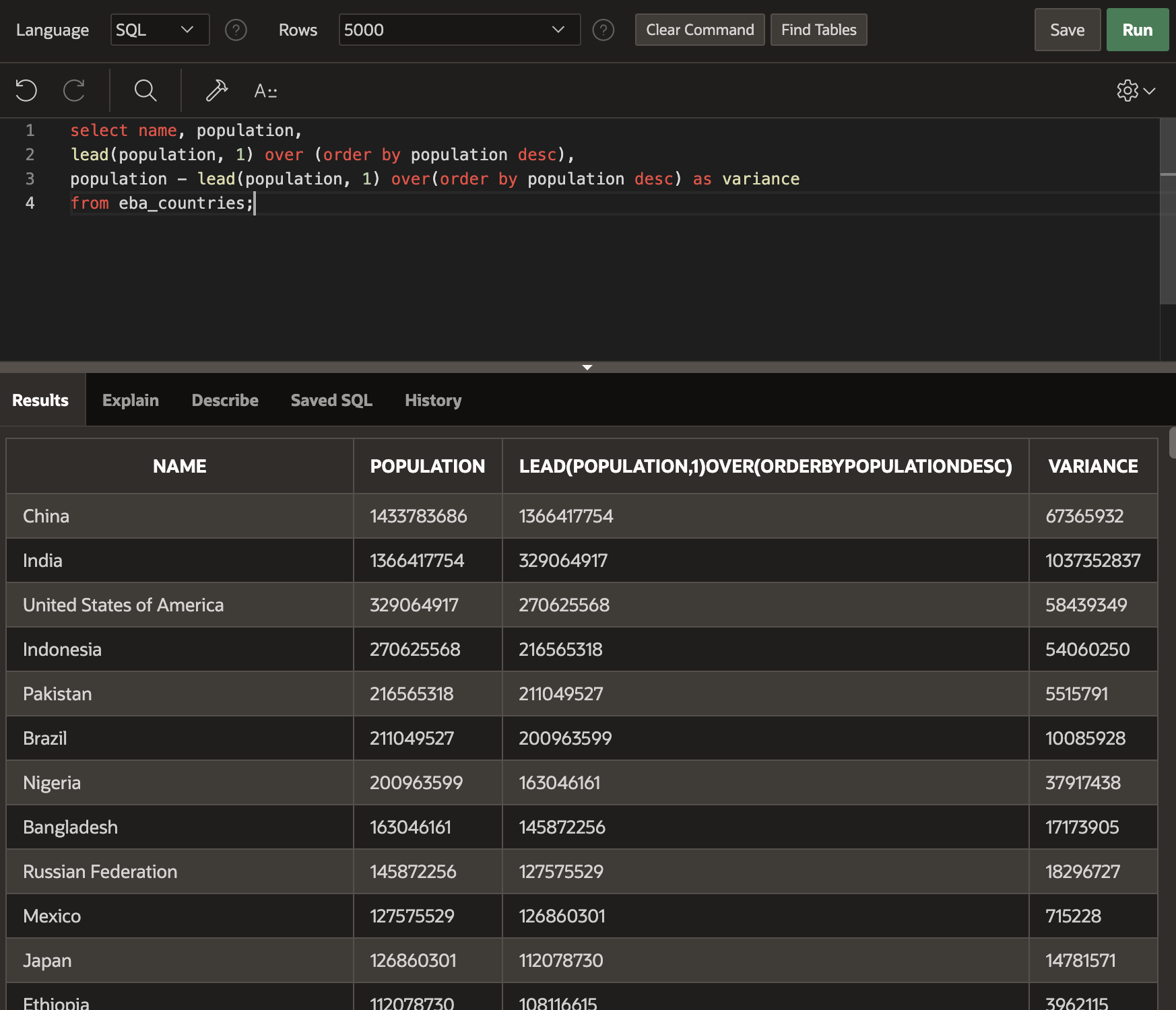
So, now we can see that the population of China is approximately 670 million more than the population. And the population of India is approximately 1 billion more than the population of the USA.
Scenario 3
Flag all countries that are in the top 10 percentile for their region in terms of population.
select name, population, region_id,
percent_rank() over(partition by region_id order by population desc),
case when
percent_rank() over(partition by region_id order by population desc) <= 0.1 then 1
else 0
end as top_10_percentile
from eba_countries;
Scenario 4
Order the countries by population in ascending order and create a running total field for the population.
select name, population,
sum(population) over (order by population asc rows unbounded preceding) as running_total_population
from eba_countries;
Scenario5
For each customer rank their orders from highest to lowest in terms of order total using Analytical Functions (use RANK())
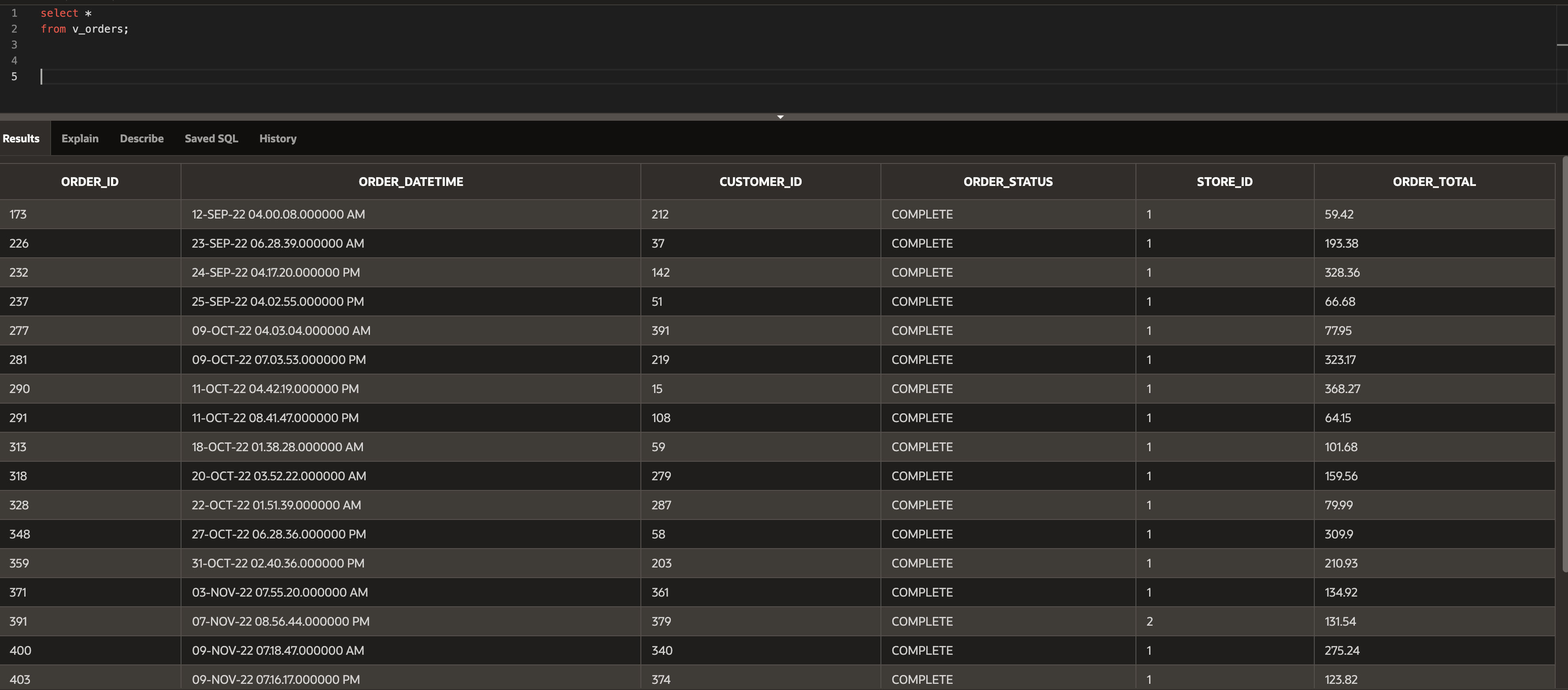
select order_id, customer_id, order_total,
rank() over(partition by customer_id order by order_total desc)
from v_orders;
Scenario 6
Using Analytical Functions find the difference between the order total for each order_id and the order_id with the maximum order total for that month/year
SELECT
ORDER_ID,
TO_CHAR(ORDER_DATETIME,'MM-YY') AS MONTH_YEAR,
ORDER_TOTAL,
ORDER_TOTAL - MAX(ORDER_TOTAL) OVER(PARTITION BY TO_CHAR(ORDER_DATETIME,'MM-YY')) AS DIFF_FROM_MAX
FROM
V_ORDERS;
Frequently Asked Questions
What are SQL window functions?
Window functions (also called analytical functions) perform calculations across a set of table rows related to the current row using the OVER() clause, allowing you to compute running totals, rankings, and row-by-row comparisons without collapsing the result into groups.
What is the difference between RANK and DENSE_RANK in SQL?
RANK assigns the same rank to tied rows but skips subsequent rank numbers (e.g., 1, 2, 2, 4), while DENSE_RANK also gives tied rows the same rank but does not skip numbers (e.g., 1, 2, 2, 3), making DENSE_RANK better for contiguous rankings.