
Once you've mastered Vue fundamentals, there's a rich set of advanced features that enable more powerful patterns and better code organization. This post covers Vue lifecycle hooks for executing code at specific component stages, watchers for reacting to data changes, the provide/inject pattern for deep component communication, and composables for reusable logic in Vue 3.
Understanding Lifecycle Hooks
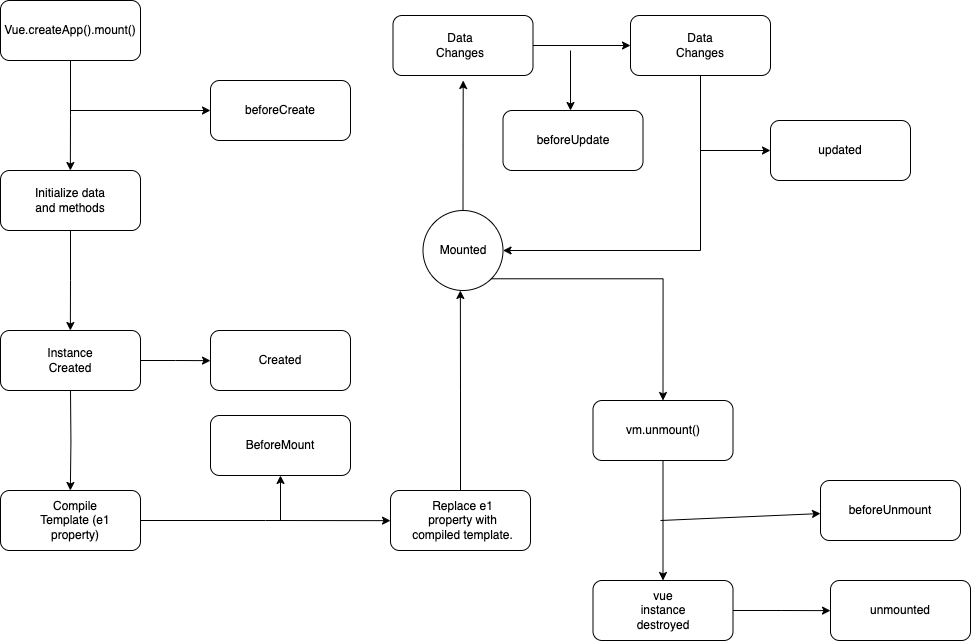
Lifecycle enables us to run code when a new instance is created, we're not limited to creating the data inside our instance. We can run code during the creation process and even after the instance is destroyed.
Before the Vue lifecycle may begin, the instance has to be created that's done using the Vue.createApp() function. This function is where you pass in your settings and data for Vue to work with. During this process, Vue will begin the lifecycle. Vue will create areas within itself where we can inject code and do whatever we want.
The very first thing Vue does is add reactivity to your data. This process is where it begins to watch your data for any changes. Before that happens, Vue has the opportunity to run some code.
The first lifecycle hook that occurs is beforeCreate hook. At this point, Vue instance hasn't been fully created. This means you won't have access to your data or any of its methods. Once everything has been initialized, the vue instance is ready.
Vue provided another lifecycle hook, which is created hook. Unlike before, we can access the data and methods inside the Vue instance. However, Vue is not mounted to any template, nor will anything be rendered onto the page.
After the Vue instance is created, it'll start looking for a template. This part of the lifecycle starts the moment we call the Mount method on the application. Vue will scan the template code and begin processing it. This process is called compiling.
Once the template is compiled, Vue will replace the content inside the element we selected with the mounted method, with the compiled template. Before that happens, vue have the opportunity to hook into the beforeMount lifecycle hook. Once mounting is completed, vue can hook into the mounted lifecycle hook. At this point, vue has inserted itself into the document. We'll be able to see the rendered template on the document.
All expressions, directives and bindings have been processed. After mounted phase is completed, your application will watch the data for any changes. This usually happens during events such as mouse clicks or inputs. Anytime the data has been updated, Vue will update the template and the cycle just repeats.
The next hook is the updated hook. This hook runs once the template is patched with updated data.
We have the ability to destroy the Vue instance. This means that any reactivity, events, directives or bindings will be disabled and gone. You may want to do this in case you want the user to no longer interact with the application. The way you destroy the instance is by calling the unmount method. Once the method has been invoked, you will take care of the rest and finally destroy the instance. During this process, there are two hooks we can use.The first hook is the beforeUnmount Hook. This hook is called before the instances are destroyed. Your application is still fully functional and present on the page. The last hook is the unmounted hook, which is triggered once the Vue instances destroyed, you won't be able to access the instance anymore. Any data or methods will be gone and inaccessible. That's the view lifecycle.
Virtual DOM
First, we need to understand what the word compile means. To put it simply, to compile something means to take something in and turn it into something else. In programming, it usually means to take in your code and convert it into other code so that another program can understand it. One example is the javascript language, machines don't understand the javascript language. We need to run it through a compiler that will convert it into machine code. The browser handles that process for you whenever you load a javascript file. Vue does something similar.
What is compiling? What does it need to compile anything in the first place? To answer the first question, Vue is compiling our templates when we use the mount method, Vue will scan the contents of the original template. That includes the expressions, directives, bindings and anything else inside of the template. It will take it in as a string and convert it into an object.
<h1 class="blue"> Hello World </h1>
Vue Compiles to
{
tag: 'h1',
attributes : {
class: "blue"
},
content: "Hello World"
}
Why does Vue compile our templates?
The two main reasons are that it's easier to manage and it provides a performance boost, especially for larger applications.
How is the virtual DOM any more efficient?
Virtual DOM is a lightweight copy of the actual DOM. It doesn't have as many properties or methods as the origin DOM, but that's ok. Its purpose is not to replace the DOM by having a lightweight copy. The process of checking each element is much faster. Once it's finished, it'll perform what's called a patch. Patching is the term used to refer to the process of updating, adding, or removing elements from the page. Vue will only update what's necessary. It won't update the whole template. If the text inside an element changes, then that's what will be changed. The entire element won't be overwritten. It does this process in bulk. If multiple changes need to happen, you will apply it all at once. This way changes are smoother.
What are components?
- Components are the pieces that make up your application. Ex: header, footer, posts, lists, etc.
- Makes it easy to manage the sections of your page.
Components are templates, but they are a bit more than that. They can contain their own data, methods, computed properties and watchers. By themselves, they can't do much. They're meant to be used in the main application. On top of allowing you to split your code into separate files, they are reusable. That part is optional.
Frequently Asked Questions
What are Vue lifecycle hooks?
Vue lifecycle hooks are special methods that are called at specific stages of a component's life — from creation (beforeCreate, created), mounting (beforeMount, mounted), updating (beforeUpdate, updated), to destruction (beforeUnmount, unmounted) — allowing you to run code at precise moments.
What is the difference between a watcher and a computed property in Vue?
A computed property derives a new value from reactive data and caches the result until dependencies change; a watcher observes a data property and executes a callback with side effects (like API calls) whenever that value changes.