

AWS Elastic Load Balancing automatically distributes incoming application traffic across multiple targets such as EC2 instances, containers, and IP addresses. This post explains the three types of AWS load balancers — Application (ALB), Network (NLB), and Gateway (GWLB) — and how to choose the right one for your architecture.
Load Balancing
Why use a load balancer?
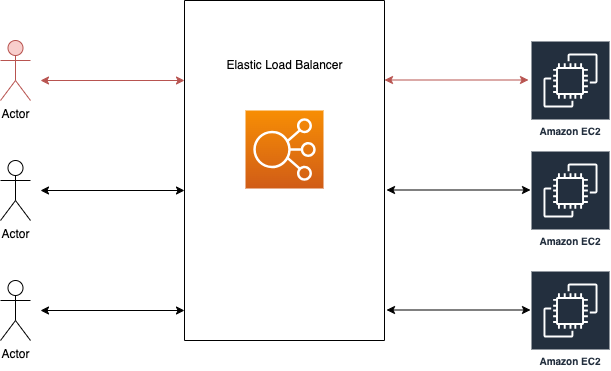
- Spread load across multiple downstream instances
- Load Balances are served that forward traffic to multiple servers (eg EC2 instances) downstream
- Expose a single point of access (DNS) to your application
- Seamlessly handle failures of downstream instances
- Do regular healthy checks on your instances
- Provide SSL termination (HTTPS) for your websites
- Enforce stickiness with cookies
- High availability across zones
- Separate public - traffic from private traffic
Why use an Elastic Load Balancer?
An Elastic Load Balancer is a managed load balancer
- AWS guarantees that it will be working
- AWS takes care of upgrades, maintenance, high availability
- AWS provides only a few configuration knobs
It costs less to set up your own load balancer but it will be a lot more effort on your end
It is integrated with many AWS offerings/services
- EC2, EC2 Auto scaling groups, Amazon ECS
- AWS Certificate Manager (ACM), CloudWatch
- Route 53, AWS WAF, AWS Global Accelerator
Application Load Balancer (v2)
- Application load balancer is Layer 7 (HTTP)
- Load balancing to multiple HTTP applications across machines (target groups)
- Load balancing to multiple applications on the same machine (ex.containers)
- Support for HTTP/2 and WebSocket
- Support redirects (from HTTP to HTTPS for example)
- Routing tables to different target groups:
- Routing based on path in URL (example.com/users & example.com/posts)
- Routing based on hostname in URL (one.example.com & other.example.com)
- Routing based on Query String, Headers (example.com/users?id=123&order=false)
- ALB are a great fit for micro services & container-based application (example: Docker & Amazon ECS)
- Has a port mapping feature to redirect to a dynamic port in ECS
- In comparison, we’d need multiple Classic Load Balancer per application
Hands-on
- Choose EC2 instance > Click Lunch instance button > put 2 Number of instances
- Network settings > Choose select existing security group
- Go Advanced Details > user Data >
- Put this
#!/bin/bash
# Use this for your user data (script from top to bottom)
# install http (Linux 2 version)
yum update -y
yum install -y httpd
systemctl start httpd
systemctl enable httpd
Echo “<h1>Hello World from ${hostname -f)</h1>” > /var/www/html/index.html
Elastic Load Balancers - SSL Certificates
- Classic Load Balancer (v1)
- Support only one SSL certificate
- Must use multiple CLB for multiple hostname with multiple SSL certificates
- Application Load Balancer (v2)
- Supports multiple listeners with multiple SSL certificates
- Uses Server Name Indication (SNI) to make it work
- Network Load Balancer (v2)
- Supports multiple listeners with multiple SSL certificates
- Uses Server Name Indication (SNI) to make it work
- Supports multiple listeners with multiple SSL certificates
Auto Scaling Groups Hands On
Click Create Auto Scaling Groups > Click create >
Step1> put name > Create Lunch Template > put name and description up to you > Lunch template contents -> choose Quick start> choose AWS Linux> base 64 > instance type - t2 micro > create instance
Next Step 2 > choose VPC > Choose Availability zone and subnets > click next
Step 3 > Choose Attach to an existing load balancer > Chose from your load balancer target groups > select target groups > Health checks - ELB > Next
Step 4 > click next
Step 5 > click next
Step 6, 7 > click next
Frequently Asked Questions
What is AWS Elastic Load Balancing?
AWS Elastic Load Balancing (ELB) is a managed load balancing service that automatically distributes incoming traffic across multiple healthy targets, improving application availability and fault tolerance.
What is the difference between ALB and NLB?
Application Load Balancer (ALB) operates at Layer 7 and is best for HTTP/HTTPS traffic with advanced routing rules, while Network Load Balancer (NLB) operates at Layer 4 for ultra-low latency and high-throughput TCP/UDP traffic.
When should you use a load balancer on AWS?
Use a load balancer when you need to distribute traffic across multiple EC2 instances, achieve high availability, perform health checks on targets, or implement zero-downtime deployments.